Gravity Runtime: Multi Threaded, Strictly Synchronous V8
Understanding Gravity - Titan Planet's strictly synchronous V8 runtime with multi-threaded execution.
🌌 Introducing Gravity
Gravity is the core force that holds the entire TitanPl system together.
Gravity is the strictly synchronous V8 runtime engine that powers TitanPl. It represents a fundamental departure from traditional JavaScript runtimes. While Node.js, Bun, and Deno rely on event loops for concurrency, Gravity achieves massive parallelism through native multi-threading and synchronous execution.
Think of Gravity as the gravitational force in the Titan ecosystem:
- It binds your JavaScript code to native Rust performance
- It grounds execution in predictable, deterministic patterns
- It pulls everything together with zero lock contention
🧱 What TitanPl Is Not
TitanPl is not a Node.js framework. It is fundamentally different.
TitanPl is a complete high-performance framework designed for modern backends. It unifies the Orbit System for O(1) routing, a powerful Extension System, and the TitanPl SDK into a cohesive platform.
It leverages Gravity Runtime, a strictly synchronous, multi-threaded Rust+V8 runtime, to execute JavaScript actions.
Unlike Node.js, Bun, or Deno, Gravity Runtime does not run an event loop. Code executes synchronously from request entry to response exit — making execution deterministic, predictable, and exceptionally fast for compute-bound workloads.
🎯 Key Architectural Principles
1. No Event Loop in Workers
Unlike Node.js which uses libuv's event loop, or Deno/Bun which use Tokio's async runtime, Gravity workers execute synchronously.
- No event queue
- No microtask queue
- No async callbacks
- No
setTimeout,setInterval, orPromisechains
2. Request-Driven Execution
Each worker processes one request at a time:
- Worker receives request from Rust dispatcher
- Worker blocks and executes the action synchronously
- Worker returns response
- Worker awaits next request
No concurrency within a single worker. Scaling happens by adding more workers, not through async I/O.
3. Synchronous IO (via Drift)
- Async Rust Core: TitanPl’s Axum server is fully asynchronous, ensuring hyper-efficient network I/O.
- Synchronous Execution: Each worker executes JavaScript linearly to ensure deterministic behavior.
- Worker Guard: Calling a native I/O API (like
t.fetch) withoutdrift()is restricted and will result in a runtime error. This prevents the worker thread from entering a blocked state. - Drift Suspension: Using
drift()allows the worker to be freed during the wait, scaling the multi-threaded worker pool even further.
// ✅ Using drift for non-blocking IO
export const fetchUser = defineAction((req) => {
  // This looks sync, but uses Orbit-based suspension/replay!
  const response = drift(t.fetch("https://api.example.com/user"));
  return response;
});
The Rust runtime handles the async I/O under the hood, and the drift() call manages the suspension and deterministic replay of your action.
4. Deterministic Execution
All code runs linearly, top to bottom:
- Easier debugging (no callback hell)
- Predictable stack traces
- No race conditions within a single request
- Reproducible behavior
5. True Isolation
Each worker owns an independent V8 isolate with:
- Zero shared state
- No cross-worker communication
- Isolated heap and garbage collection
- Crash isolation (one worker crash doesn't affect others)
6. No require or import.meta
- ES6 imports only (
import/export) - Dependencies are bundled with esbuild
- No dynamic
require()at runtime - No Node.js module resolution
7. No Async/Await
JavaScript actions cannot use:
async/awaitPromisechainssetTimeout/setIntervalprocess.nextTick- Any other asynchronous primitives (except
drift())
🔄 Synchronous Execution Model
Here's how a request flows through Gravity:
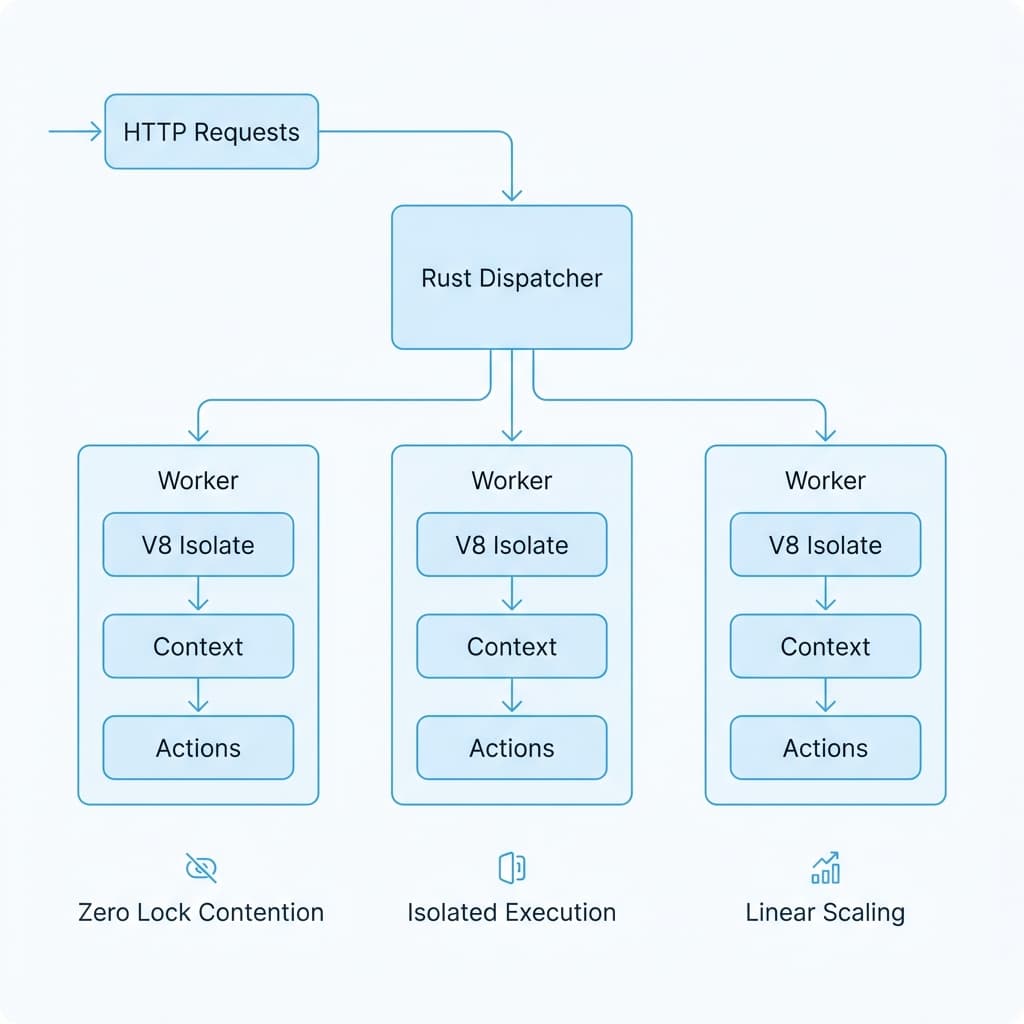
Key Points:
- The Rust Axum server is async (for network I/O efficiency)
- Each worker executes JavaScript synchronously
- Blocking calls (like
t.fetch()) pause the worker until complete - The worker returns a response and becomes available for the next request
🚀 Multi-Threaded Architecture
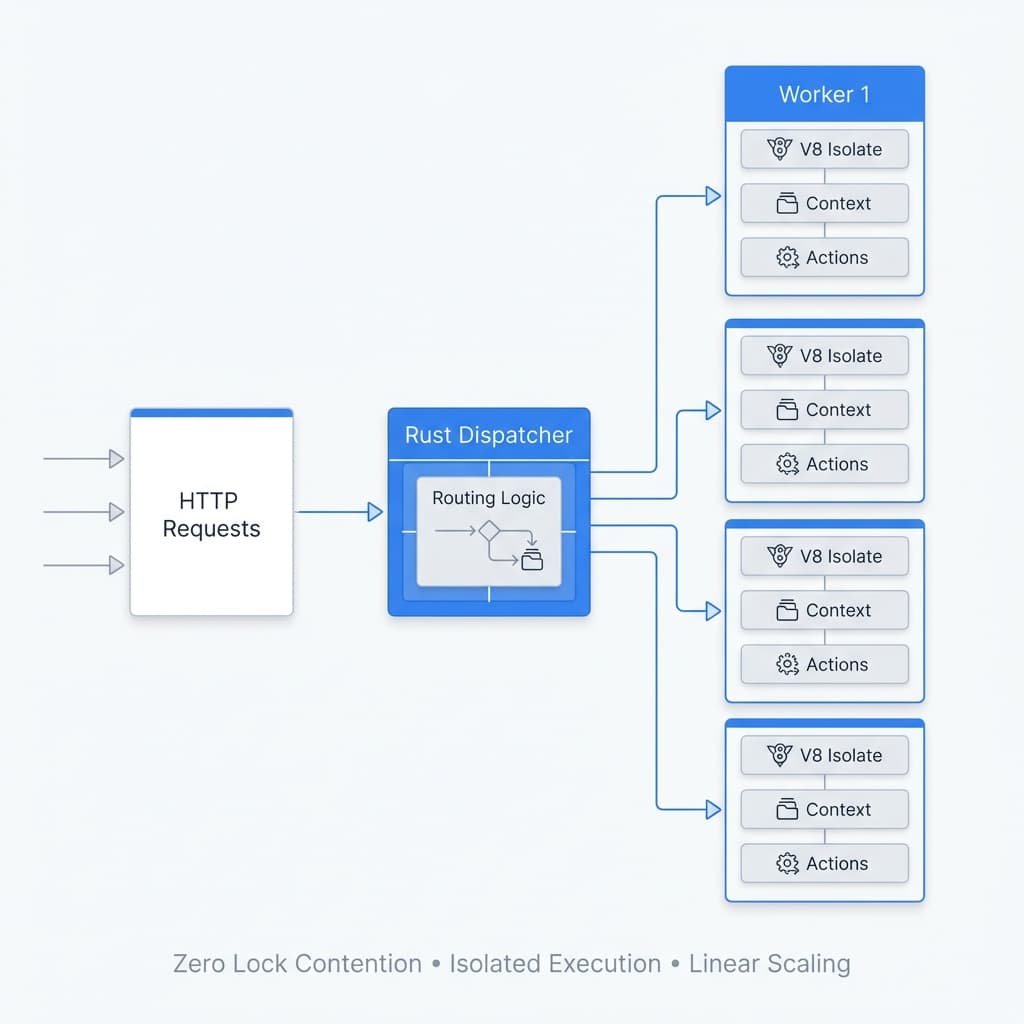
Gravity achieves massive concurrency through native multi-threading, not async I/O.
How It Works
Gravity spins up a worker pool, where each worker owns:
- Its own V8 isolate (completely independent JavaScript runtime)
- Its own context (global scope, compiled actions)
- Its own compiled actions (pre-compiled bytecode)
- No event loop (synchronous execution only)
Workers never share locks, never block each other, and never wait for global state.
Concurrency Model
HTTP Requests → Rust Load Balancer → Workers (parallel execution)
                                      ├─ Worker 1 (V8 Isolate, Context, Actions)
                                      ├─ Worker 2 (V8 Isolate, Context, Actions)
                                      ├─ Worker 3 (V8 Isolate, Context, Actions)
                                      └─ Worker N (V8 Isolate, Context, Actions)
Each CPU core runs JavaScript independently:
- Zero lock contention
- Linear scaling with core count
- Massive throughput under real traffic
- No "Stop-the-World" garbage collection across workers
Configuring Worker Threads
You can control the number of worker threads directly in your application entry point (app/app.js) using the t.start function.
// Start server on port 3000, log message, and spawn 12 worker threads
t.start(3000, "Titan Running!", 12);
Parameters:
- Port: The port number to listen on (e.g.,
3000). - Message: A startup message to log to the console.
- Thread Count (Optional): The specific number of worker threads to spawn.
Default Behavior:
If the Thread Count argument is omitted, Gravity automatically calculates the thread count based on your hardware:
Default Threads = CPU Core Count * 4
Example: If you have 16 CPU cores and do not specify a thread count, Gravity will spawn 64 worker threads.
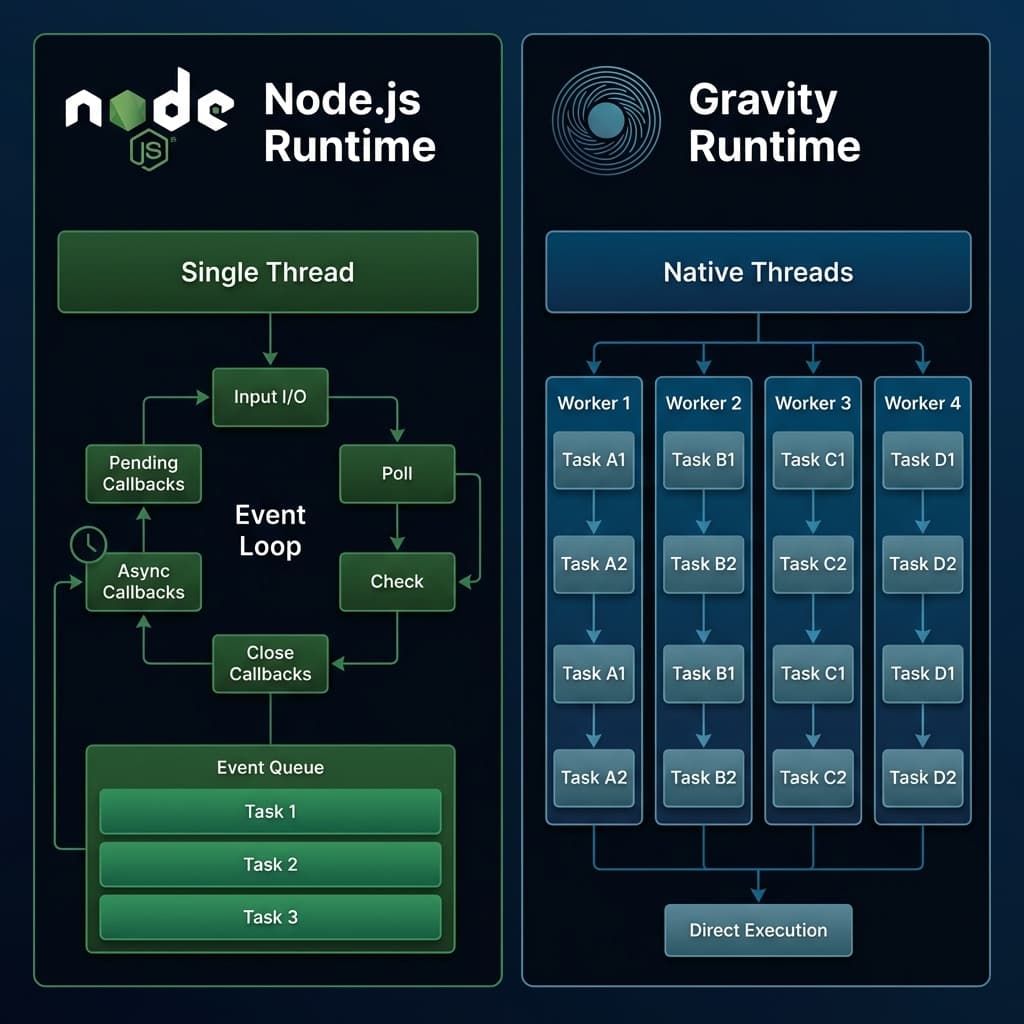
🆚 Gravity vs. Node.js
| Feature | Node.js Runtime | Gravity Runtime |
|---|---|---|
| Execution Model | Event Loop (libuv) | Synchronous Workers |
| Concurrency | Async I/O (Single Main Thread) | Native Multi-threading |
| Scaling | Vertical (limited by event loop) | Linear (scales with cores) |
| Memory | Shared Heap (GC blocks all) | Isolated Heap per Worker |
| CPU Utilization | Single-core bottleneck | Full Hardware Utilization |
| Async/Await | ✅ Required for I/O | ❌ Not Supported |
| Promises | ✅ Yes | ❌ No |
| Event Loop | ✅ Yes | ❌ No |
Node.js Runtime
Strengths:
- Excellent for I/O-heavy workloads
- Non-blocking async operations
- Rich ecosystem of async libraries
Limitations:
- Single-threaded execution for user code
- Event loop can become bottleneck
- Async overhead for CPU-bound tasks
Gravity Runtime
Strengths:
- True multi-threaded JavaScript execution
- Linear scaling with CPU cores
- Deterministic, predictable execution
- No async overhead
Limitations:
- Cannot use async/await or Promises
- Not ideal for I/O-heavy services with high concurrency
- Requires more workers to scale (trades memory for performance)
⚡ When to Use Gravity
✅ Perfect For
-
CPU-bound or compute-heavy services
- AI/ML inference
- Data transformations
- Complex business logic
- Cryptography
-
Deterministic execution requirements
- Financial calculations
- Gaming backends with tick-based logic
- Reproducible computations
-
Linear debugging workflows
- Simple stack traces
- No callback hell
- Predictable execution order
-
Predictable memory usage per worker
- Isolated heaps
- No shared state management
-
Crash isolation
- One worker crash doesn't affect others
- Easy recovery and error handling
❌ Not Ideal For
-
I/O-heavy services with high concurrency
- Use Node.js, Deno, or Bun instead
- Async I/O is more efficient for these workloads
-
Applications requiring
setTimeout, Promises, or async/await- Gravity does not support async primitives
-
Real-time event-driven architectures
- Event loops are better suited for this
🔧 Migration from Async Patterns
If you're coming from Node.js, do not try to use async patterns.
❌ This Will NOT Work
export const processData = defineAction(async (req) => {
  const data = await fetchFromDatabase();
  const result = await processWithAI(data);
  return { result };
});
✅ Use Synchronous Blocking Calls
export const processData = defineAction((req) => {
  // These calls block until complete
  const data = drift(t.db.query("SELECT * FROM users"));
  const result = processWithAI(data); // Synchronous function
  return { result };
});
Chaining Operations
Instead of Promise chains:
// ❌ Node.js style
const result = await fetch(url1)
  .then(res => res.json())
  .then(data => fetch(url2, { body: data }))
  .then(res => res.json());

// ✅ Gravity style
const res1 = t.fetch(url1);
const data = JSON.parse(res1.body);
const res2 = t.fetch(url2, { body: JSON.stringify(data) });
const result = JSON.parse(res2.body);
🎯 Why Multi-Threading Matters
Traditional JavaScript runtimes:
- Run user code on one thread
- Rely heavily on async I/O to "fake" concurrency
- Collapse under CPU-heavy workloads
Gravity eliminates this limitation:
Every worker can execute CPU-bound JavaScript simultaneously — zero blocking.
This is ideal for:
- 🤖 AI Systems — Parallel processing of heavy logic and data
- 🎮 Gaming Backends — Low-latency, real-time state synchronization
- 📈 Real-time Analytics — High-frequency data transformations
- ⚡ Compute-heavy Actions — Multi-user concurrency without blocking
🌌 Gravity: The Future of JavaScript Backend Engines
With native Rust + V8 multi-threading, Gravity becomes:
- Faster for CPU-bound workloads
- More scalable under load
- Safer and more predictable
- Architecturally modern
- Ready for enterprise-grade traffic
Remember: Gravity trades async flexibility for synchronous predictability and true multi-threaded performance. Choose the right tool for your workload.