Drift: Asynchronous Operations in TitanPl
Understanding TitanPl's mechanism for handling asynchronous operations within a synchronous-looking execution flow.
🌀 How Drift Works in TitanPl
Drift is TitanPl's mechanism for handling asynchronous operations within a synchronous-looking execution flow. It allows you to write linear, easy-to-read code without dealing with async/await chains or callback hell, while still maintaining high-performance non-blocking I/O.
Worker Pausing & Error Behavior
When a native API (like t.fetch) is called without drift(), the worker thread pauses until the operation completes. Using I/O APIs without drift() will trigger a runtime error as it blocks the multi-threaded execution model.
🪐 The Lore of Port 5100
Titan is Saturn's VI (6th) moon. In the design language of TitanPl, the Roman numeral VI is visually interpreted as 51 (V=5, I=1). This makes 5100 the signature default port ("Orbit") for TitanPl servers.
🛰️ The Concept: Deterministic Replay
Gravity is a high-performance multi-threaded runtime that executes TitanPl actions. To achieve asynchronous behavior without blocking the execution threads, TitanPl uses a Replay-based Suspension model (similar to Algebraic Effects).
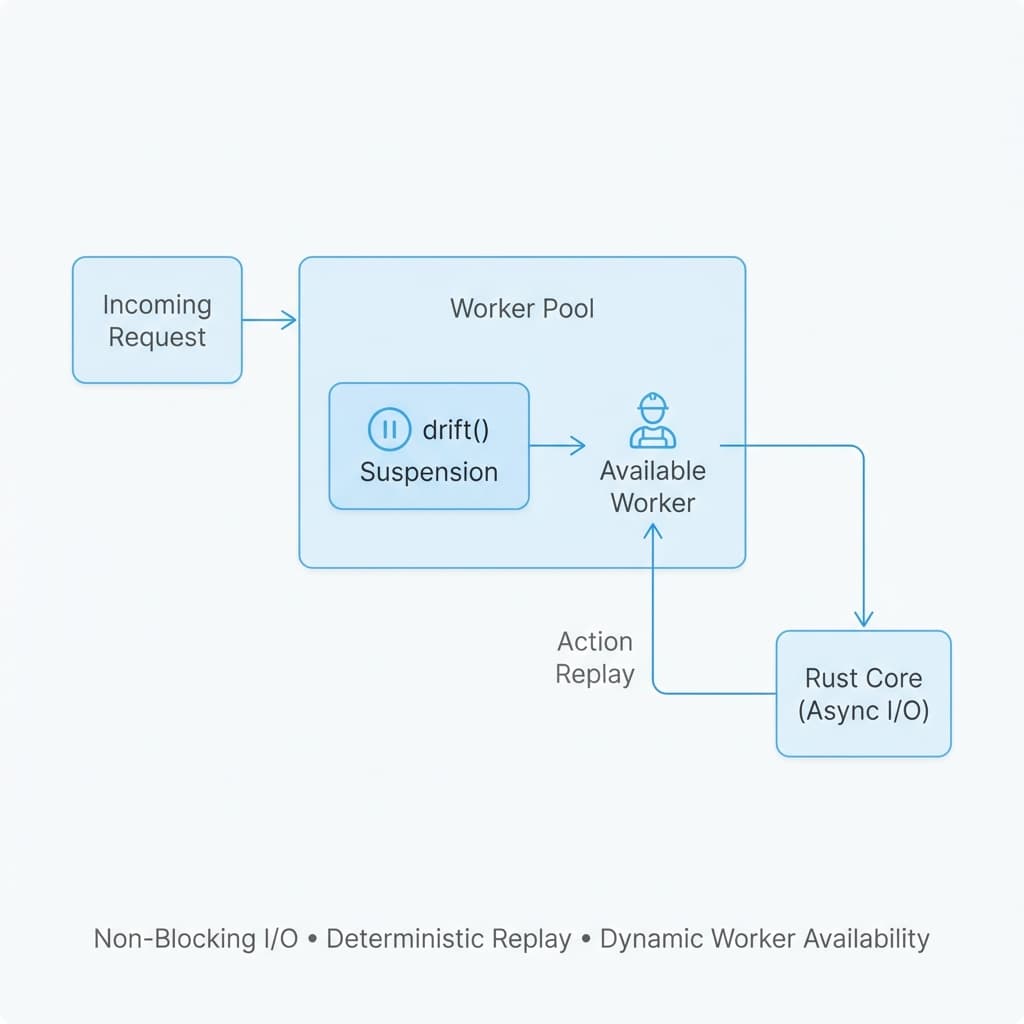
Architectural Foundation:
- Async Rust Core: The Axum server is fully asynchronous for maximum network I/O efficiency.
- Synchronous Workers: Each worker executes JavaScript synchronously to ensure predictability.
- Native Blocking: Standard calls (without
drift()) pause the worker until complete. This is discouraged as it blocks the worker thread from handling other requests. - Dynamic Availability: Once an action completes or a
drift()suspends it, the worker is immediately returned to the pool.
The Execution Cycle
- Start: The action starts executing synchronously.
- Drift Call: When your code encounters a
drift()call:const resp = drift(t.fetch("http://example.com"));- The runtime checks if a result already exists for this specific
driftcall (identified by a stable ID). - First Run (Suspension): If no result exists:
- The runtime suspends execution of the action.
- It dispatches the async task (e.g., HTTP fetch) to the background Tokio executor.
- The V8 Isolate stops working on this request and becomes free to handle other tasks.
- Resume (Replay): Once the background task completes:
- The runtime re-schedules the action.
- The action re-runs from the very beginning.
- The runtime checks if a result already exists for this specific
- Completion:
- When the execution reaches the same
drift()call again, the runtime injects the completed result immediately. - The function continues execution past the
drift()call as if it happened synchronously.
- When the execution reaches the same
⚠️ Important Note on Side Effects (Logging)
Because TitanPl uses Deterministic Replay, any operations that occur before a drift() call will be executed multiple times (once for the initial run and once for each replay triggered by subsequent drift calls).
For example, if you use t.log():
export const myAction = (req) => {
    t.log("Action started"); // This will log twice!
    const data = drift(t.fetch("..."));
    return { success: true };
};
In this scenario, you will see "Action started" in the logs twice:
- When the action first runs and suspends.
- When the action replays after the
fetchcompletes.
Operations after the drift() call will only execute once (during the final replay).
Best Practice: To avoid unexpected double-logging or repeated side effects, it is recommended to place your drift() calls at the very top of your action code whenever possible.
High Concurrency Warning: Under extreme concurrency or high system load, the drift mechanism may occasionally fail to resume or experience increased latency (Orbit stabilization issues). This is a known behavior of the current replay-based model in TitanPl.
⏸️ Worker Pausing (The "No-Drift" Penalty)
When a native API (like t.fetch or db.query) is called without drift(), the worker thread enters a hard-pause state.
What happens?
- Execution Freeze: The JavaScript execution is halted until the native operation (e.g., waiting for an HTTP response) completes.
- Resource Lock: While paused, that specific worker thread cannot handle any other incoming requests, reducing your Orbit's total throughput.
- Async Error: Titan tracks these operations and will emit a runtime error if it detects I/O tasks being performed outside of a
drift()context.
Always use drift() for I/O operations to ensure your worker can suspend and free up resources for other tasks.
💎 Benefits
- Synchronous Syntax: Write code as
const data = drift(...)instead ofconst data = await .... - State Simplicity: No need to manage complex Promise chains.
- High Concurrency: While an action is "waiting" (suspended), the underlying worker/isolate is completely free to handle other requests.
🛠️ Usage
Wrapped usage for HTTP requests:
export const myAction = (req) => {
    // This looks sync, but is actually async + non-blocking!
    const user = drift(t.fetch("http://api.internal/users/1"));
    const posts = drift(t.fetch(`http://api.internal/posts?user=${user.id}`));

    return {
        user,
        posts
    };
};
⚙️ Internal Mechanics
The TitanPl RuntimeManager handles the scheduling:
- Request Queue: Incoming requests.
- Resume Queue (High Priority): Completed drift operations triggering a replay.
When drift() triggers, the runtime captures the "Suspension" exception, offloads the work, and later re-runs the code with the result injected into the drift(...) return value.