How Titan Works
A visual deep dive into TitanPL's request lifecycle, compilation process, and Gravity Runtime execution.
🔍 The Big Picture
Titan transforms your JavaScript/TypeScript code into a high-performance native Rust server. Here's how it all works together.
🏗️ Build-Time: From Code to Binary
1. Action Discovery
Titan scans your app/ directory for action files:
app/
├── actions/
│   ├── user.js          → /actions/user
│   └── auth/
│       └── login.js     → /actions/auth/login
2. Bundling with esbuild
Each action is bundled independently:
- Tree-shaking: Only used code is included
- Dependency resolution: All imports are inlined
- Type stripping: TypeScript types are removed
- ES6 module output: Clean, modern JavaScript
// Before bundling (user.js)
import { validateEmail } from '../../utils/validation';
export const getUser = defineAction((req) => { ... });

// After bundling (optimized, dependencies inlined)
const validateEmail = (email) => { ... };
export const getUser = defineAction((req) => { ... });
3. Rust Code Generation
Titan generates Rust code that:
- Registers each action's route
- Maps HTTP paths to action functions
- Creates the routing table
// Generated Rust (simplified)
pub fn register_actions(router: Router) -> Router {
    router
        .route("/actions/user", post(execute_user_action))
        .route("/actions/auth/login", post(execute_login_action))
}
4. Compilation
The Rust server is compiled into a native binary:
cargo build --release
   Compiling titan-server v26.12.1
   Finished release [optimized] target(s) in 12.3s
Result: A single binary executable with Gravity (embedded V8 runtime) and all actions.
⚡ Gravity Runtime: Request to Response
Phase 1: HTTP Server (Rust Axum)
When a request arrives at http://localhost:3000/actions/user:
- Axum receives the HTTP request (highly efficient Rust async I/O)
- Router matches the path to
/actions/user - Request is dispatched to an available worker
Phase 2: Worker Execution (Gravity Runtime)
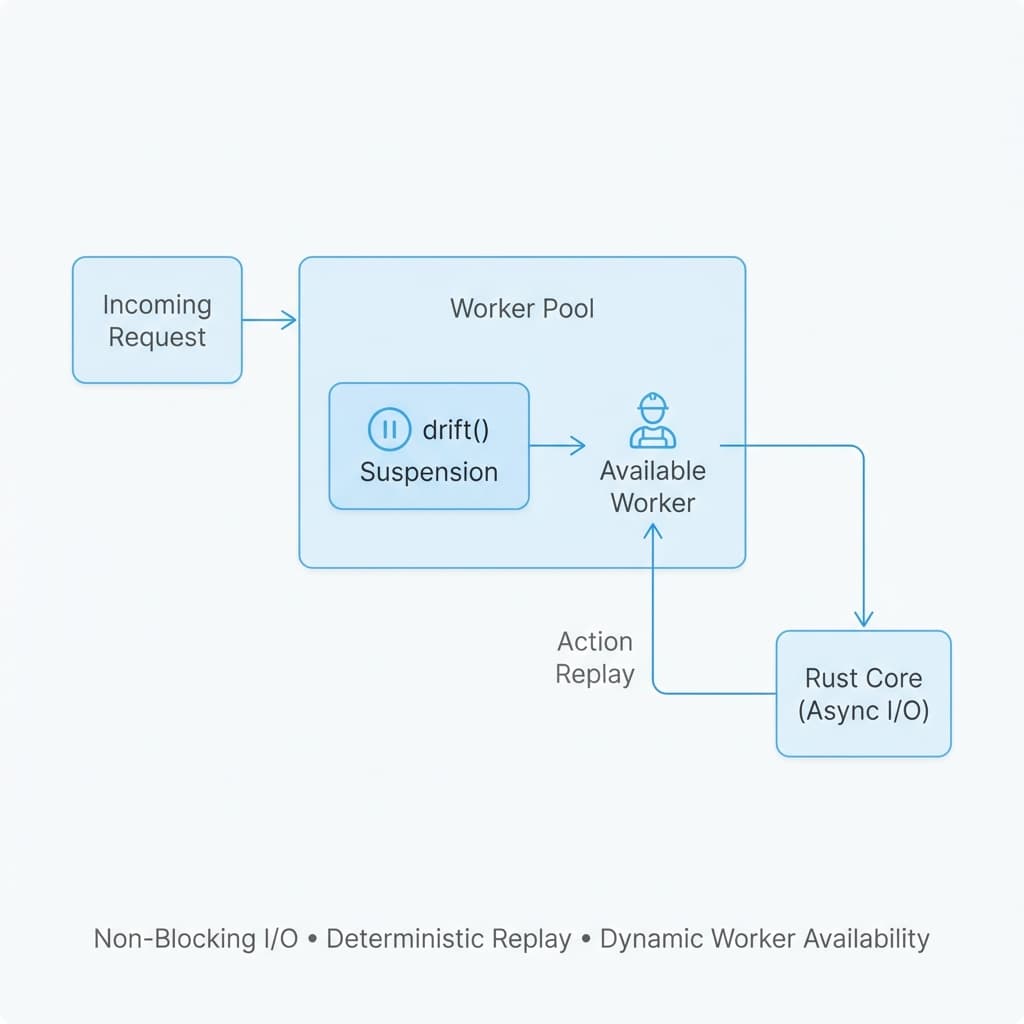
Each worker:
- Receives the request (headers, body, query params)
- Enters V8 isolate (managed by multi-threaded Gravity)
- Calls the action function
- Executes synchronously — If
drift()is encounterd, the worker is freed during the I/O wait. - Returns the response back to Axum
// Your action code
export const getUser = defineAction((req) => {
  // This runs inside a V8 isolate
  const userId = req.query.id;

  // Non-blocking call to database via Drift
  const user = drift(t.db.query(`SELECT * FROM users WHERE id = ?`, [userId]));

  return {
    status: 200,
    body: { user }
  };
});
From JavaScript's perspective:
- Everything is synchronous-looking (via Drift)
- No
async/await, no callbacks, no promises - Linear execution, top to bottom
Key Architectural Principles:
- Async Rust Core: The Axum server is fully asynchronous for maximum network I/O efficiency.
- Synchronous Workers: Each worker executes JavaScript synchronously to ensure predictability.
- Worker Guard: Native blocking calls (without
drift()) are disallowed and will trigger a runtime error to preserve concurrency. - Worker Availability: Once an action completes or a
drift()suspends it, the worker returns to the pool for the next request.
Phase 3: Response
The result flows back:
JavaScript Result → Rust Handler → Axum Router → HTTP Response🧵 Worker Pool Architecture
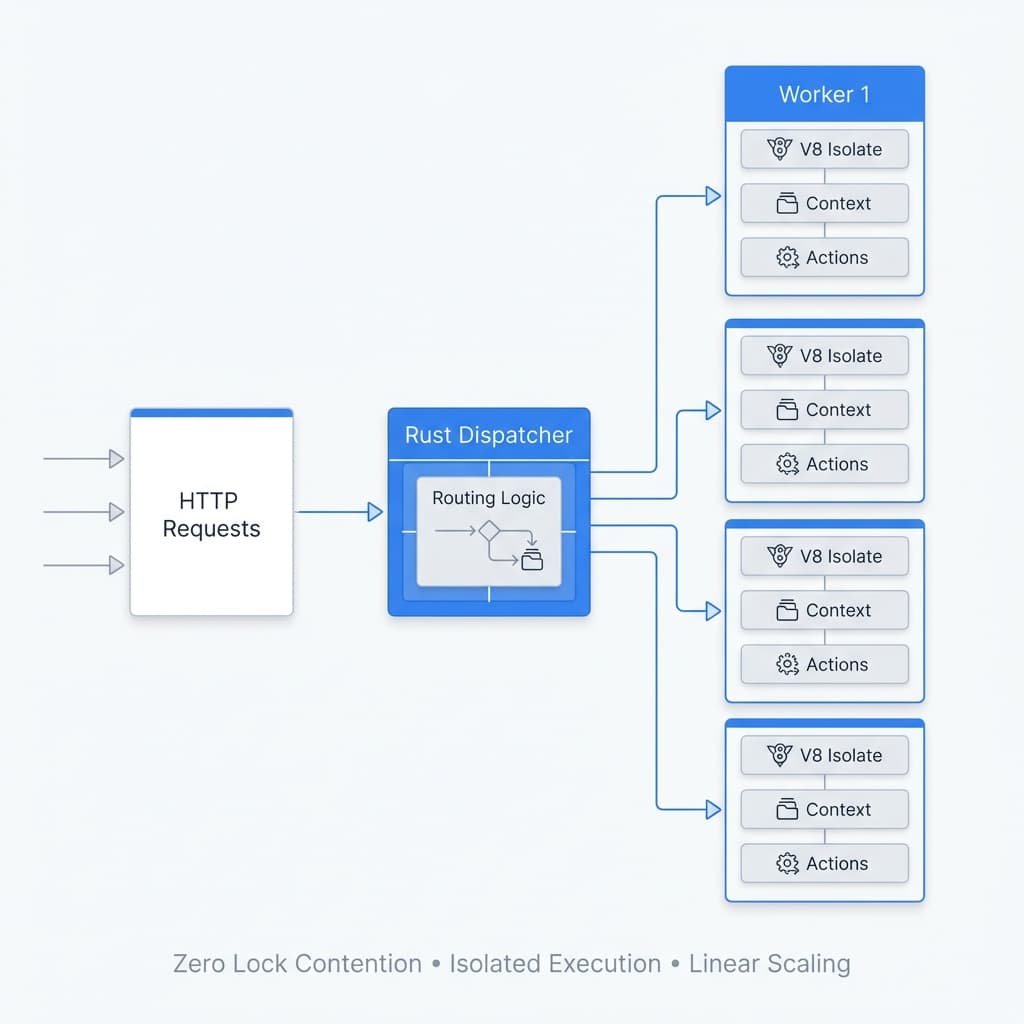
Initialization (Server Start)
When the server starts:
- Worker pool is created (e.g., 8 workers on an 8-core machine)
- Each worker initializes:
- Creates a V8 isolate
- Loads and compiles all action bundles
- Registers Gravity runtime APIs (
t.fetch,t.db, etc.)
- Workers enter idle state, waiting for requests
Request Distribution
                    ┌─────────────────┐
Incoming Requests → │ Rust Dispatcher │
                    └────────┬────────┘
                             │
              ┌──────────────┼──────────────┐
              ▼              ▼              ▼
         ┌─────────┐   ┌─────────┐   ┌─────────┐
         │Worker 1 │   │Worker 2 │   │Worker N │
         │ [Busy]  │   │ [Idle]  │   │ [Idle]  │
         └─────────┘   └─────────┘   └─────────┘
Dispatcher Logic:
- Maintains a queue of available workers
- Assigns requests to idle workers
- If all workers are busy, request waits in queue
Zero Lock Contention:
- Workers never share state
- No global locks
- No mutex contention
🔄 Development Mode
In development (titan dev), Titan adds:
Hot Reload
- File watcher monitors
app/directory - On change detected:
- Re-bundle affected actions
- Reload action code in all workers
- No server restart needed
Error Reporting
Titan captures:
- Syntax errors (esbuild compilation)
- Runtime errors (JavaScript exceptions)
- Stack traces (with source maps)
Displayed in a beautiful Next.js-style error overlay.
🎯 Cold Start Characteristics
TitanPL Cold Start: ~3-5ms
Why so fast?
- No disk I/O: Actions are pre-loaded in memory
- No module resolution: Everything is bundled
- Pre-compiled bytecode: V8 compiles on startup, not per-request
- Gravity embedded: No separate process spawning
Compare to:
- AWS Lambda (Node.js): 100-500ms cold start
- Traditional Node.js server: 50-200ms per worker spawn
📊 Data Flow Diagram
┌─────────────┐
│ Your Code   │
│ (app/)      │
└──────┬──────┘
       │
       ▼
┌─────────────┐
│  esbuild    │ ← Bundle each action
└──────┬──────┘
       │
       ▼
┌─────────────┐
│ Rust Codegen│ ← Generate routing table
└──────┬──────┘
       │
       ▼
┌─────────────┐
│cargo build  │ ← Compile to native binary
└──────┬──────┘
       │
       ▼
┌─────────────────────────────────┐
│   Native Binary (executable)    │
│                                  │
│  ┌────────────────────────────┐ │
│  │  Axum HTTP Server (async)  │ │
│  └───────────┬────────────────┘ │
│              │                   │
│  ┌───────────▼───────────────┐  │
│  │   Worker Pool (V8s)       │  │
│  │  ┌──────┐  ┌──────┐       │  │
│  │  │Worker│  │Worker│  ...  │  │
│  │  │  1   │  │  2   │       │  │
│  │  └──────┘  └──────┘       │  │
│  └───────────────────────────┘  │
└─────────────────────────────────┘
       │
       ▼
   HTTP Responses
🧠 Memory Model
Per-Worker Memory
Each worker owns:
- V8 Heap: ~40-80MB (configurable)
- Compiled Actions: Pre-compiled bytecode
- Gravity APIs: Native bindings to Rust
Workers are completely isolated:
- No shared heap
- No shared objects
- Garbage collection is per-worker
Total Memory Usage
For an 8-worker server:
Base Rust Server:     ~10-20 MB
Worker 1-8 (V8):      ~320-640 MB (8 × 40-80 MB)
Total:                ~330-660 MB
Trade-off:
- More memory usage than single-threaded Node.js
- But true parallelism and zero lock contention
🚀 Why This Architecture?
Design Goals
- Performance: Native Rust + V8 = maximum speed
- Simplicity: Synchronous code = easier debugging
- Scalability: Multi-threading = linear scaling
- Isolation: Per-worker isolates = crash safety
- Developer Experience: Hot reload + great errors
Inspired By
- Chrome's process-per-tab: Isolation for stability
- Deno's multi-isolate approach: Secure, sandboxed execution
- Actix/Hyper (Rust): High-performance HTTP servers
- V8 Engine: Proven JavaScript performance
📚 Next Steps
- Gravity Runtime Architecture — Deep dive into synchronous execution